Product Updates
Save routes for later, and close out flights the way real pilots do
Stop losing the perfect leg between sim sessions. Bookmark real routes in Flight Browser, pick them up anytime on any device, and file richer Career reports that dispatch reviews before your hours count.
A lot of sim nights start the same way. You are not ready to fly your roster yet. You are hunting. FlightAware tabs, a spreadsheet, maybe a group chat thread with three city pairs and no flight numbers. Twenty or forty-five minutes later you have something you like, and you hope you remember it tomorrow.
That is the problem we set out to fix in this release. Not by adding more noise, but by giving you two calmer paths through SimRoster: one for choosing what to fly next, and one for closing the loop after you land. Save for later is the headline. A rebuilt Flights tab and a more honest Career report sit right beside it.
Save for later: your shortlist, not a one-night memory
Flight Browser was already built for the question we hear constantly: “I want to fly tonight. What real route should I pick?” Thousands of real city pairs, real airlines, real aircraft families, filters when you care about haul or region, and a Lucky button when you want the app to choose for you. That is the freedom side of SimRoster, the same spirit as on our landing page: find any flight in any region, for any airline, in any aircraft, then go.
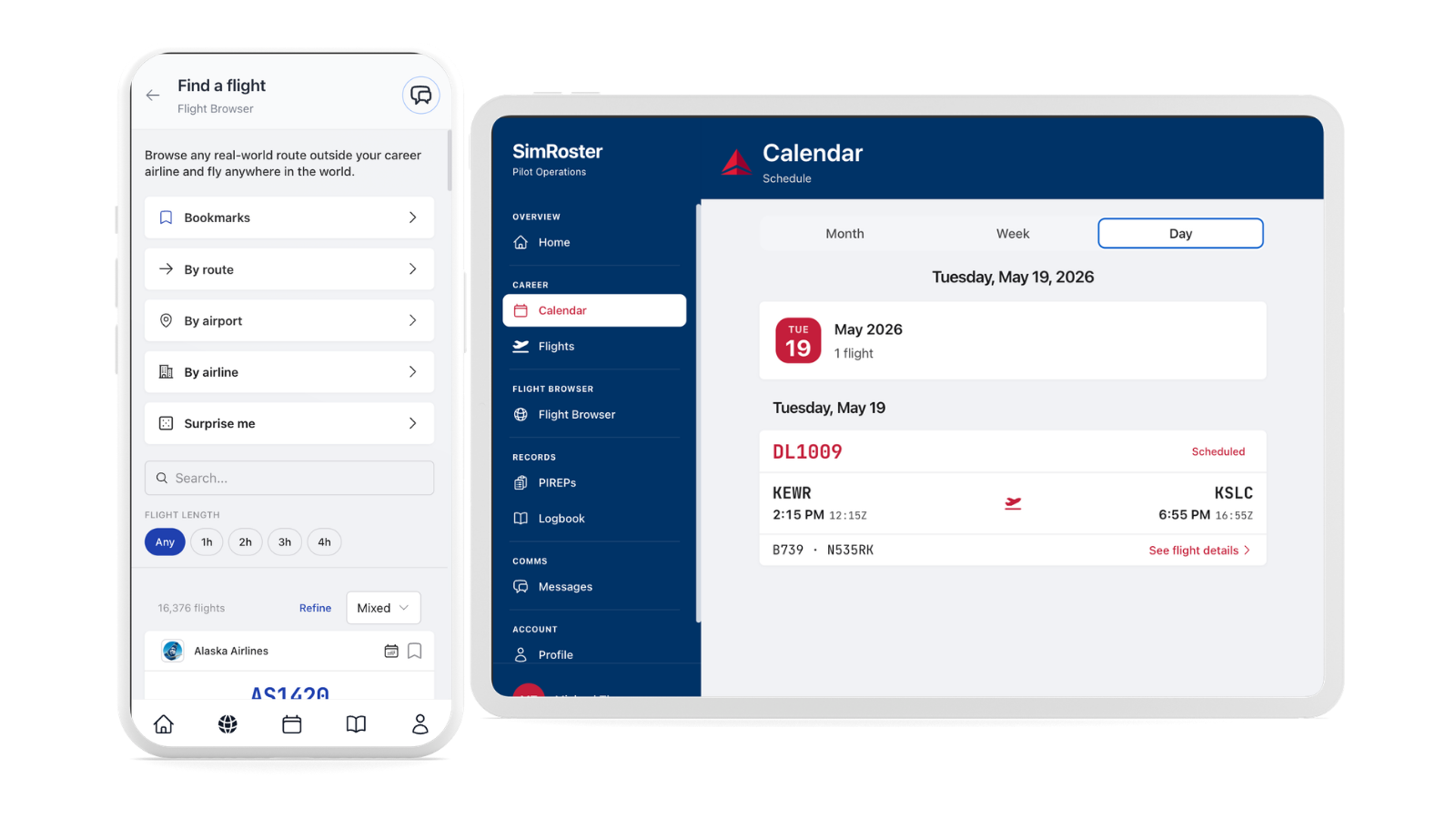
What was missing was a way to pause without losing the hunt. You would spot a perfect leg (the right length, the right metal, the right carrier) and then close the app to eat dinner or deal with life. Next session you started over.
Now, while you browse Flight Browser, tap the bookmark on any route card. That leg lands in Saved for later. Your shortlist syncs to your account, so the same routes wait for you on your phone, your tablet, or your desktop. No spreadsheet. No screenshot of a flight number you cannot read tomorrow.
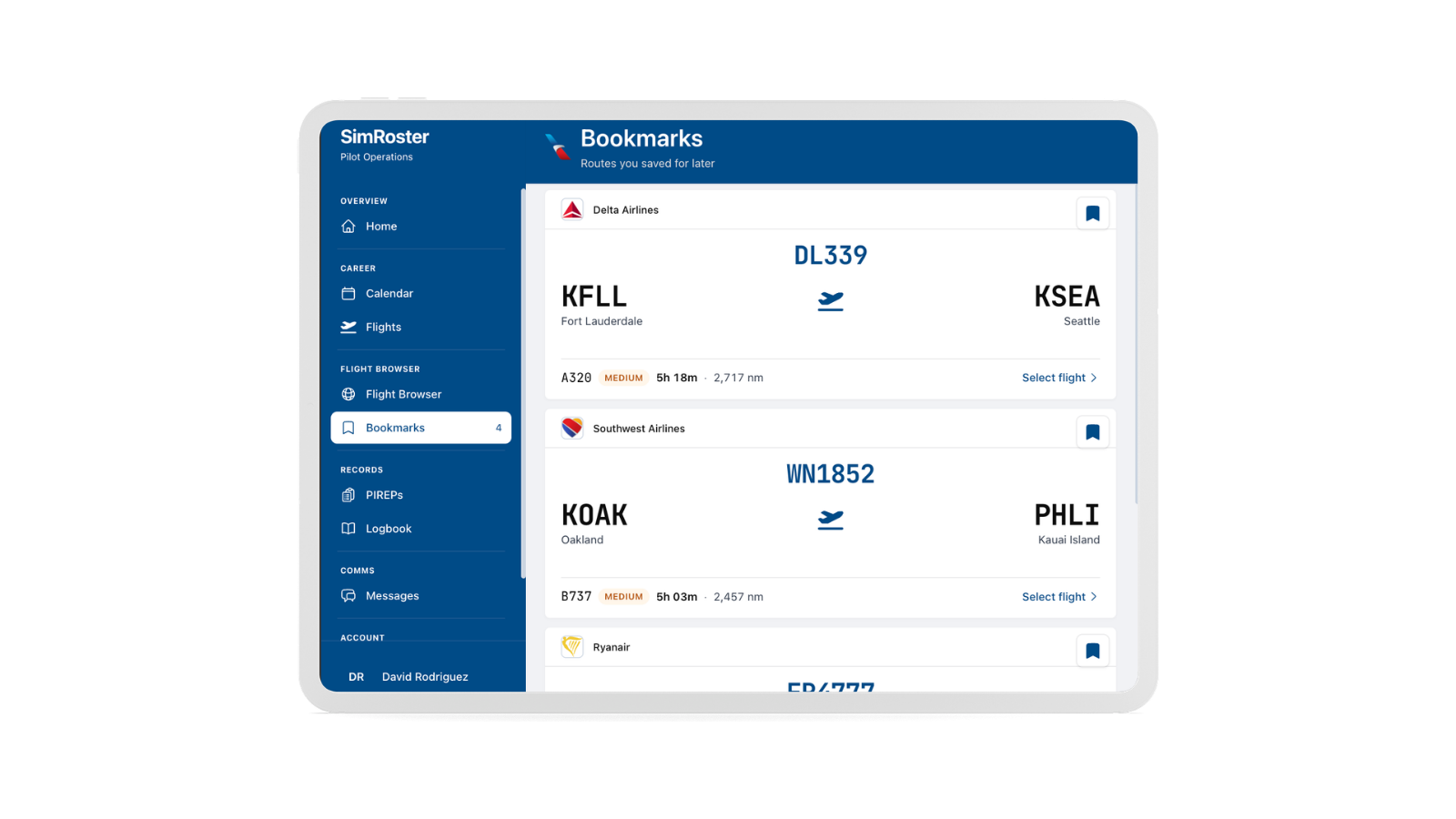
- Browse by airport, airline, city pair, or let Surprise me pick something real.
- Bookmark anything interesting (up to fifty routes) without starting the flight.
- Open Flights → Saved for later when you are ready; tap the card and fly.
Route cards in the browser now feel like the assignment cards you already know from Career mode: the details are the point, and you tap the card when you mean to fly. No giant button in the way. Bookmark sits to the side so you do not accidentally launch a leg when you only wanted to save it.
A Flights tab that finally matches how you think
Career mode and Flight Browser are two different moods. One is your contract, your roster, your progression toward Captain. The other is spontaneous legs when you want freedom. Cramming both behind a single switch made the app feel busy, like two products fighting for the same strip of glass.
The Flights tab now opens to a simple menu, the same calm pattern as Logs:
- Roster: your career assignments and schedule, unchanged in spirit, just easier to reach.
- Find a flight: straight into Flight Browser when you know you are browsing, not flying the line yet.
- Saved for later: your bookmarked routes, with a count so you can see the shortlist waiting for you.
Home still points you at Find a flight when you want speed. The hub is for pilots who like choosing their intention first. Less clutter, fewer mis-taps, more room to breathe.
Career reports: dispatch review and a form that respects your sim session
Saving routes solves the before. Filing your report after the flight needed the same care.
In Career mode the rhythm is familiar: fly the assignment in the sim, come back, file a PIREP. That report is how your block time, logbook, and rank stay honest. In the real world, paperwork does not always credit instantly. Someone on the operations side checks times, matches the line you were given, and signs it off.
SimRoster now works the same way for Career flights. When you file, your block time is recorded and held for dispatch review, usually within a few hours and always within about a day. You get a message when the flight is validated and your hours count. While you wait, the report shows a clear pending status so you are never guessing.
We also heard from MSFS and desktop sim pilots that the old form felt too thin. After a long leg you have fuel, METARs, runways, taxi times, and notes you would put on a real report. Hiding that behind “optional details” was the wrong call. The full flight details section is on screen when you file. Nothing extra is required. Block-off, block-on, and block time still get you home. The room is there if you want it:
- Crew role and landings for your logbook record.
- Flight plan, runways, and whether you were in VMC, IMC, or mixed conditions.
- Taxi times, delays, fuel, weights, weather, icing, turbulence, cruise data, and operational remarks.
Logs got the same treatment: a small home that asks what you want (file a Career PIREP or work in your personal logbook) instead of two tabs glued together. Career paperwork stays separate from the entries you keep for yourself.
Dispatch review applies only to assigned Career flights, the line that moves your rank. Flight Browser legs and personal logbook entries are still yours to log without that queue, the way they should be.
How to use it on your next sim night
- Open Flights → Find a flight. Filter or use Surprise me. Bookmark two or three legs that fit your evening.
- When you are ready, open Saved for later and tap the one you want. Same card, same briefing flow as always.
- After a Career assignment, open Logs → File a PIREP (or your assignment’s Log flight action), enter your times, add whatever detail you actually have, and submit.
- Watch your inbox for dispatch; validated hours land in your logbook and progression.
Freedom and structure, same app
SimRoster was never meant to be only a roster app or only a route browser. It is both. Career Mode when you want the long game: sign a contract, fly assignments, earn Captain. Flight Browser when you want “I want to fly tonight” without the homework of hunting across the internet.
Save for later connects those worlds. You can discover on a lunch break and fly on a slow Sunday. You can build a shortlist for the week and work through it like a personal charter board. However you sim, the app stops feeling like a glorified logbook with extra steps and starts feeling like the place you open first.
This release is live now for subscribers. Open SimRoster, bookmark something you are excited about, and tell us what should be on the list next.